
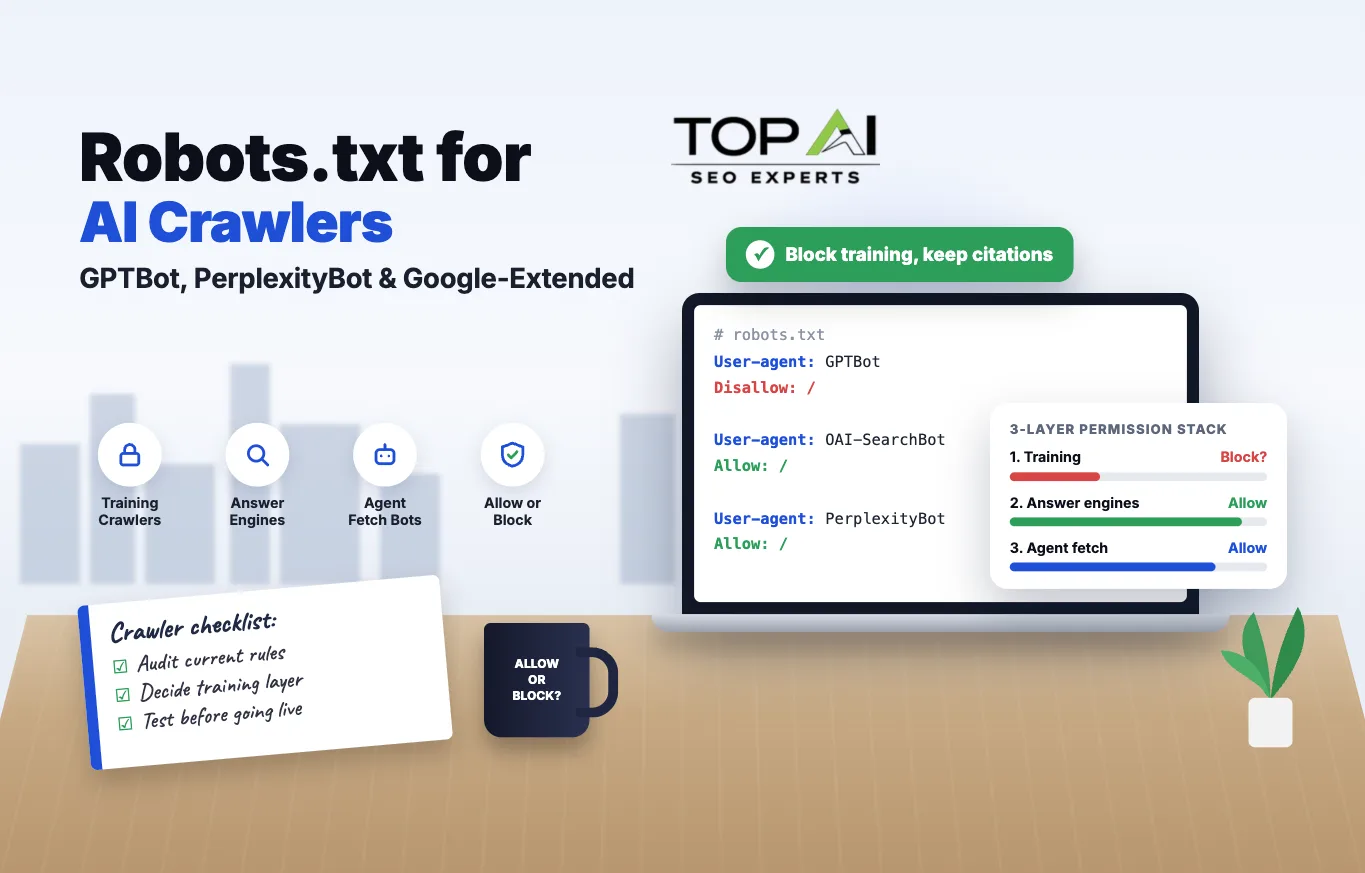
- It’s not one decision. Robots.txt controls training, AI citations and agent fetches separately.
- Use the three-layer stack. Decide training, answer-engine and agent access one at a time.
- Robots.txt is an honor system. It only stops crawlers that choose to comply.
- llms.txt is not permission. One is a map, the other is access control.
Most “block GPTBot in robots.txt” advice treats AI crawler management as one decision: allow or block. It isn’t. A single robots.txt file is actually making three separate calls at once, whether you realize it or not: whether your content trains the next foundation model, whether it gets cited in a live AI answer, and whether an AI agent can read your page the moment a real user asks it to. Mixing those up is why so many sites end up either fully blocked from AI search (and invisible in ChatGPT, Perplexity, and Google AI Mode) or fully open with no idea what’s happening to their content.
Robots.txt for AI crawlers works by adding a separate “User-agent” group for each bot’s specific token (GPTBot, PerplexityBot, Google-Extended, ClaudeBot, and others) and setting Allow or Disallow rules under it, the same mechanism search engines have used for crawl control since 1994, now applied to a new category of bot. The catch is that robots.txt is a voluntary signal, not an access control system. A compliant crawler reads the file and respects it. A non-compliant one, or one spoofing a browser user-agent to get around blocks, ignores it entirely. Understanding which crawlers actually honor the file, and what each one controls once you block or allow it, matters more than memorizing the syntax.
Why “just block the AI bots” is the wrong starting question
Search this topic and you’ll find two camps. One says block everything to stop AI companies from training on your work for free. The other says allow everything because AI search is where traffic is headed and you can’t get cited if you’re invisible. Both are answering a question that’s too simple. AI crawlers don’t do one job. OpenAI alone runs four separate bots with four different purposes: GPTBot for training, OAI-SearchBot for ChatGPT Search indexing, ChatGPT-User for live fetches during an active chat session, and OAI-AdsBot for checking ad landing pages. Blocking GPTBot does not stop your pages from being cited in ChatGPT Search results, and allowing OAI-SearchBot does not mean your content is being used to train anything.
We cover the broader technical setup, including llms.txt and crawl budget management, in our technical SEO for AI crawlers service breakdown. This article goes one layer deeper: the actual decision logic for which bots to allow, which to block, and why the answer is rarely “all of them” in either direction.
The three-layer crawl permission stack
After working through every major AI crawler’s documentation and testing what blocking each one actually changes, the decision collapses into three layers. Treat each one as its own yes/no question, because the business trade-off is different at each layer.
| Layer | Bots | The question it answers |
|---|---|---|
| 1. Training | GPTBot, Google-Extended, ClaudeBot, CCBot, Applebot-Extended | Should this content train a future foundation model? |
| 2. Answer engine / retrieval | OAI-SearchBot, PerplexityBot, Googlebot (for AI Overviews) | Should this content be cited in a live generated answer? |
| 3. Agent / user-fetch | ChatGPT-User, Perplexity-User, Claude-User | Should a live agent read this page when a user asks it to? |
Layer 1, Training
Should this content be used as raw material to train a future version of a foundation model? This is the layer most publishers actually care about when they say “I don’t want AI stealing my content.” GPTBot, Google-Extended, Applebot-Extended, and CCBot (which feeds the Common Crawl dataset that many smaller AI labs train on) all sit here. Blocking this layer has no effect on whether you show up in today’s AI answers.
Layer 2, Answer engine and retrieval
Should this content be eligible to be read, summarized, and cited in a live generated answer right now? OAI-SearchBot, PerplexityBot, and Googlebot’s role in powering AI Overviews live here. This is the layer that actually drives the kind of visibility our GEO services and AEO services work is built around. Block this layer and you lose citations, not just training data use.
Layer 3, Agent and user-triggered fetch
Should a bot be allowed to fetch this specific page the instant a real person asks an AI agent to look at it? ChatGPT-User and Perplexity-User fall here. These requests happen because a human is actively using the assistant and asked it to check your page, which is closer to a browser request than a background crawl. Several of these bots state plainly that standard crawl-blocking rules may not fully apply to them, because the fetch is user-initiated rather than autonomous indexing.
A publisher worried about AI companies training on years of proprietary research might reasonably block every Layer 1 bot while leaving Layer 2 and 3 wide open, so they still get cited and still get agent traffic. A SaaS company trying to get named in every “best tool for X” ChatGPT answer has the opposite priority: Layer 2 access matters more than anything else, and Layer 1 is a secondary concern. There’s no universal right answer, only a right answer for your specific content and business model.
What each major AI crawler actually controls
Here’s the current landscape as of late 2026, pulled from each operator’s own documentation rather than secondhand lists. User-agent strings and version numbers do change over time, so treat the token names as stable but re-check version suffixes periodically.
| Crawler | Operator | What it controls | Respects robots.txt? | Typical default |
|---|---|---|---|---|
| GPTBot | OpenAI | Training future models | Yes | Block if training opt-out desired |
| OAI-SearchBot | OpenAI | ChatGPT Search indexing/citations | Yes | Allow |
| ChatGPT-User | OpenAI | Live fetch during a user’s chat | Partial (user-triggered) | Allow |
| Google-Extended | Gemini / AI training & grounding | Yes (control token) | Allow or block, no Search impact | |
| Googlebot | Search indexing & ranking | Yes | Always allow | |
| PerplexityBot | Perplexity | Crawling for answer index | Yes | Allow for citations |
| ClaudeBot | Anthropic | Training / retrieval crawling | Yes | Allow or block by policy |
| Applebot-Extended | Apple | Apple Intelligence training | Yes | Block if training opt-out desired |
| CCBot | Common Crawl | Open dataset used by many LLMs | Yes | Block if avoiding downstream reuse |
GPTBot (OpenAI) crawls content that may be used to train OpenAI’s generative models. Its full user-agent string currently reads compatible; GPTBot/1.4; +https://openai.com/gptbot, and OpenAI publishes the IP ranges it crawls from as a JSON file at openai.com/gptbot.json, which is the most reliable way to verify a request claiming to be GPTBot is genuine rather than spoofed (per OpenAI’s crawler documentation).
OAI-SearchBot (OpenAI) is a separate bot that crawls specifically to surface and cite pages in ChatGPT Search. If you block GPTBot but leave OAI-SearchBot alone, you’re opting out of training while staying eligible for citations, which is the single most common configuration we’d recommend for publishers who want visibility without donating training data.
ChatGPT-User (OpenAI) fires when a live user asks ChatGPT to visit a specific URL mid-conversation, for example “check this product page and tell me if it’s in stock.” OpenAI’s own documentation notes that robots.txt rules may not fully apply to this bot, because it’s acting as an extension of a real person’s request in the moment, not running an autonomous background crawl.
Google-Extended is a control token, not a separate crawler with its own IP footprint. Google’s documentation is explicit that “Google-Extended doesn’t have a separate HTTP request user agent string; crawling is done with existing Google user agent strings.” It governs whether content Google has already crawled may be used to train future Gemini models and power AI grounding, and critically, Google states that “Google-Extended does not impact a site’s inclusion in Google Search nor is it used as a ranking signal in Google Search.” You can block AI training use without touching your organic rankings, which is the single most misunderstood fact in this entire topic.
Googlebot itself should essentially never be blocked unless you want to disappear from Google Search entirely, including AI Overviews, which draw from the regular search index rather than a separate crawl.
PerplexityBot (Perplexity) crawls and indexes content for Perplexity’s answer engine. Perplexity’s documentation gives the exact block syntax publishers need (User-agent: PerplexityBot followed by Disallow: /), and separately notes its IP pool can change over time, with the latest ranges published on Perplexity’s own site rather than frozen in the docs. There’s also a distinct Perplexity-User token for live, user-triggered fetches, mirroring OpenAI’s training-versus-agent split.
ClaudeBot (Anthropic) crawls for both training and retrieval purposes depending on context, and like the others, respects standard robots.txt directives.
Applebot-Extended governs whether Apple can use crawled content to train the models behind Apple Intelligence, separate from Applebot’s role in powering Siri and Spotlight search results.
CCBot (Common Crawl) isn’t run by an AI lab at all. It’s a nonprofit web archive that many smaller AI companies and research labs use as a training data source instead of running their own crawler. Blocking CCBot is the single highest-leverage move for publishers worried about their content ending up in models they’ve never heard of, because dozens of downstream projects pull from this one dataset.
The actual syntax, layer by layer
Robots.txt groups are matched by exact, case-sensitive user-agent token. Each bot needs its own group; you cannot combine three bot names under one User-agent line the way some guides imply. Here’s a working example that blocks Layer 1 training crawlers while keeping Layer 2 and Layer 3 open, which is the configuration we set up most often for content publishers and SaaS companies alike:
User-agent: GPTBot
Disallow: /
User-agent: Google-Extended
Disallow: /
User-agent: Applebot-Extended
Disallow: /
User-agent: CCBot
Disallow: /
User-agent: OAI-SearchBot
Allow: /
User-agent: PerplexityBot
Allow: /
If instead you want to block a crawler everywhere except specific sections, for example allowing a documentation hub to be cited while keeping gated case studies out of training sets, path-level rules work the same way they do for Googlebot:
User-agent: PerplexityBot
Allow: /docs/
Disallow: /case-studies/
One detail that trips people up: a blank Disallow: line (with nothing after the colon) means “allow everything,” while Disallow: / means “block everything.” It’s a single character of difference between fully open and fully closed, which is exactly the kind of mistake worth testing before you ship a change live. It’s also why our 47-point technical SEO checklist treats a robots.txt review as its own line item separate from general crawlability, rather than folding AI-specific directives into the same catch-all check.
Want this done for your site?
Get a free AI SEO audit and see exactly where your visibility stands in Google and AI search.
Robots.txt vs. llms.txt: they solve different problems
These two files get confused constantly, and the confusion leads to wasted effort. Robots.txt is an access-control signal, governed by the formal Robots Exclusion Protocol standard (RFC 9309) published by the IETF in 2022. It tells a compliant crawler what it may and may not request. Llms.txt is a proposed, unofficial convention, a plain-Markdown index of a site’s most important pages, meant to make content easier for an LLM-based tool to locate once it’s already decided to read your site. One is permission. The other is a map. Publishing a beautifully organized llms.txt file does nothing to fix a page that GPTBot is actively disallowed from reaching, and blocking GPTBot in robots.txt does nothing to make your llms.txt file more useful to the tools that do read it. Treat llms.txt as a minor convenience you add after your robots.txt permissions are already deliberate, never as a substitute for them.
The trade-off nobody states plainly enough
Here’s the part most “how to block AI bots” articles skip past: robots.txt is an honor system, not a lock. A 2024 analysis from Cloudflare, which sits in front of a meaningful share of the web, found that around 39% of the top one million internet properties on its network were accessed by AI bots in a single month, but fewer than 3% of them had actually blocked or challenged those bots (Cloudflare, “Declaring your AIndependence”). That gap exists partly because most site owners haven’t gotten around to it, and partly because robots.txt only stops crawlers that choose to identify themselves honestly. A scraper that spoofs a standard browser user-agent string walks right past a robots.txt block, because the file only works on bots that read it and comply voluntarily. This is also exactly why IP-range verification matters for the bots that publish one (OpenAI’s JSON files are the clearest example): if you’re seeing traffic claiming to be GPTBot from an IP outside that published range, it isn’t GPTBot, and robots.txt rules won’t stop it. For that category of bad actor, server-level blocking or a service like Cloudflare’s bot-management tooling is doing real work that a text file alone cannot.
So the real trade-off isn’t “visibility versus control,” it’s “visibility versus the specific slice of control robots.txt can actually deliver.” Blocking every AI crawler buys you a clean conscience and a weaker legal argument if your content turns up in a model anyway, not an airtight guarantee. Allowing every crawler buys you maximum citation surface area and zero say in how a compliant company uses what it finds. Most businesses land somewhere in between, and the three-layer framework above is how you decide where.
Common mistakes worth avoiding
A handful of errors show up repeatedly when we audit robots.txt files for AI readiness. Blocking Googlebot by accident while trying to block Google-Extended is the costliest one; they’re different tokens entirely, and a typo there tanks your organic search traffic for a reason that has nothing to do with AI. Assuming a single Disallow: /ai-bots/-style wildcard catches every AI crawler is another; there is no shortcut group that covers “all AI bots,” each one needs its own explicit User-agent block. Forgetting that a security plugin or CDN may already be blocking these bots by default is a third; several popular WordPress security plugins and CDN configurations now ship with AI-crawler blocking pre-enabled, which means a site owner who never touched robots.txt can still be fully blocked from AI citations without knowing it. And treating a robots.txt change as permanent rather than reviewing it quarterly is the fourth; new bot tokens appear often enough that a file set once in early 2026 is already missing coverage by the end of the year.
If your current setup falls into any of those categories, that’s exactly the kind of gap we catch in a free AI SEO audit, which checks bot access alongside the rest of your technical AI-visibility setup rather than robots.txt in isolation.
A simple decision workflow
For a business deciding on this for the first time, working through it in this order avoids most of the mistakes above:
Pull your current robots.txt and check it against the crawler table above. Note which bots are already blocked, including any blocks added silently by a security plugin or CDN.
Decide your Layer 1 (training) position first, since it’s the most values-driven decision and the least technical. If you’re unsure, blocking GPTBot, Google-Extended, Applebot-Extended, and CCBot while leaving everything else open is a defensible, low-risk starting position for most content businesses.
Decide Layer 2 (answer engine) based on your actual goal: if being cited in ChatGPT, Perplexity, and AI Overviews drives leads or brand awareness you want, keep OAI-SearchBot, PerplexityBot, and Googlebot fully open, no exceptions.
Leave Layer 3 (agent/user-fetch bots) open by default, since blocking it mainly stops real users from getting an answer about your own page, with little benefit to you.
Write the explicit User-agent groups, test the file with a robots.txt validator before publishing, and re-check it quarterly as new bot tokens are announced.
This workflow pairs well with the broader groundwork covered in our guide to what LLM SEO actually means and our walkthrough of ranking in Google AI Overviews, since crawler access is the prerequisite that makes the rest of that work possible, not a substitute for it.
Frequently asked questions
01Will blocking GPTBot hurt my Google rankings?
No. GPTBot is operated by OpenAI and has nothing to do with Google’s search index. Blocking it only affects whether OpenAI can use your content to train future models. The bot that affects your Google rankings is Googlebot, which should never be blocked, and Google-Extended, which Google explicitly states has no effect on Search inclusion or ranking.
02If I block AI crawlers, will ChatGPT and Perplexity stop citing my site?
It depends which bot you block. Blocking GPTBot (training) has no effect on citations. Blocking OAI-SearchBot or PerplexityBot specifically will stop those tools from citing your pages in generated answers, because those are the bots responsible for retrieval and indexing, not training.
03Is llms.txt a replacement for robots.txt?
No. Llms.txt is an unofficial, proposed convention for helping an AI tool locate your key pages once it’s already allowed to crawl them. Robots.txt is the formal, RFC 9309-backed mechanism that controls whether a crawler may access your site at all. Publishing an llms.txt file does nothing to override a robots.txt block.
04Does robots.txt actually stop AI companies from scraping my content?
Only against crawlers that choose to honor it. It is a voluntary protocol, not a technical barrier. A bot that identifies itself honestly and respects the standard will comply. A scraper that spoofs a different user-agent string will not. For that risk, server-level bot detection or a CDN-level bot-management feature provides enforcement that a text file cannot.
05Should e-commerce and SaaS sites take a different approach than publishers?
Generally yes. A SaaS company or e-commerce brand usually wants maximum Layer 2 visibility, since being named when someone asks an AI assistant “what’s the best tool for X” or “where can I buy Y” drives direct revenue. A publisher whose business model depends on original research or subscription content has more reason to restrict Layer 1 training use, since the content itself is the product. We break this down by business type in our SaaS AEO and GEO services and e-commerce AEO and GEO services guides.
Getting this configuration right is a technical decision with a real business trade-off behind it, not a one-size-fits-all checkbox. If you want a second pair of eyes on what your current robots.txt is actually doing across all three layers, book a free AI SEO consultation and we’ll walk through it with you.